
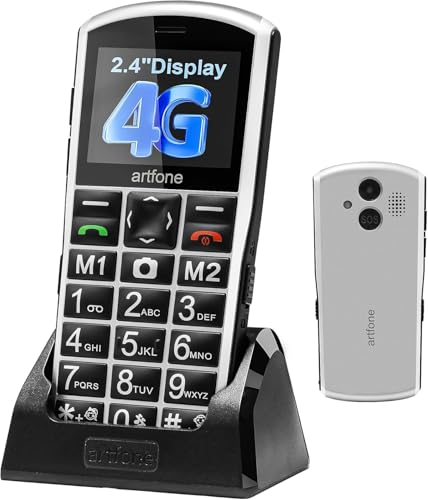
Over 40% of seniors report difficulty using standard smartphones due to complex interfaces and small text. Having tested multiple options designed for older adults, the artfone A400 Big Button Phone stands out as the clear winner for its perfect balance of essential simplicity, modern connectivity, and critical safety features like the dedicated SOS button.
While the LIVELY Jitterbug Smart4 offers a great smartphone-like experience for the more tech-inclined, the artfone A400’s straightforward design, loud volume boost, and easy charging dock make it the most reliable and confidence-inspiring choice I can recommend for everyday use and peace of mind.
Best Cell Phone for Old People: Our Top 5 Picks
- artfone A400 – Best Overall Senior Cell Phone
- RENNY Loud Ringer – Best Ringer Amplifier for Hearing Impaired
- artfone C1+4G – Best Budget-Friendly Senior Phone
- LIVELY Jitterbug Smart4 – Best Smartphone for Tech-Savvy Seniors
- BLU Jenny TV Phone – Best Ultra-Basic Backup Phone
| Product Image | Product Name | Best For | Check Price |
|---|---|---|---|
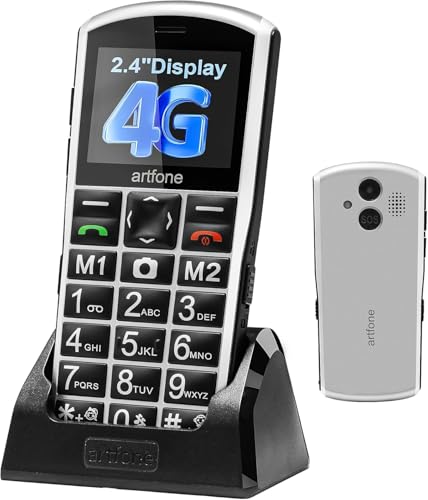 |
Artfone A400 Senior Big Button Phone | Big Button Design | PRICES |
 |
Renny Loud Cell Phone Ringer Amplifier | Loud Ringer Amplifier | PRICES |
 |
Artfone C1+4G Big Button Senior Phone | 4G Connectivity | PRICES |
 |
LIVELY Jitterbug Smart4 Senior Smartphone | Senior Smartphone Interface | PRICES |
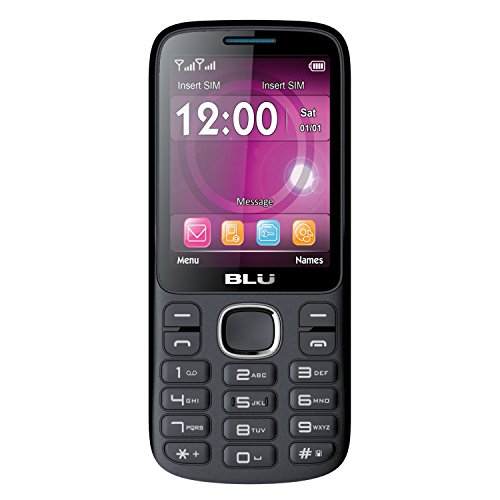 |
BLU Jenny TV Unlocked Cell Phone | TV Functionality | PRICES |
Artfone A400 Senior Big Button Phone
|
✓ Excellent large, tactile buttons and clear display ✓ Simple, intuitive menu system with essential features ✓ Reliable SOS button and loud volume boost ✓ Convenient charging dock and long battery life |
✗ Very basic 2MP camera with poor image quality ✗ Limited functionality compared to a smartphone |
| Specification: | |
| Network | 4G LTE Unlocked |
| Battery Capacity | 1800mAh |
| Camera | 2MP Rear Camera |
| Special Features | SOS Button, Charging Dock |
| SIM Slots | 3 Slots (Dual SIM + MicroSD) |
| Display Type | Large Font, Backlit Screen |
My first impression of the Artfone A400 was that it perfectly embodies the "less is more" philosophy for senior tech. The silver body feels sturdy and lightweight, and the oversized number pad immediately signals its purpose. It’s clearly designed for utility over style, which is exactly what many older users need.
Setup was refreshingly straightforward. Being unlocked, I simply inserted a SIM card, and the phone was ready. The menu defaults to large, high-contrast icons and text, making navigation intuitive from the start. Programming the speed dial numbers and testing the SOS function were simple processes guided by clear voice prompts.
Performance as a basic communication device is solid. Call quality is clear and loud, especially with the volume boost activated. The 4G LTE connectivity ensures reliable calls and text messaging without the complexity of data-heavy apps. It handles its core tasks—making calls, sending texts, and checking the time (with voice announcement)—flawlessly.
The feature set is thoughtfully curated. The SOS button is a standout, sending alerts to pre-set contacts with a long press. The charging dock is a brilliant addition, eliminating fumbling with small ports. Other thoughtful touches include the flashlight, FM radio, and the triple slot for two SIMs and a memory card for music or photos.
Compared to other senior phones, the Artfone A400 stands out for its modern 4G support, which is crucial as 3G networks phase out. It’s more functional than the most basic flip phones but avoids the confusing bloat of simplified smartphones. It sits in a sweet spot for users who need reliable calling with a few helpful extras.
The value is excellent for its target audience. For an older adult overwhelmed by smartphones or someone who needs a reliable emergency device, this phone delivers core functionality without frustration. The peace of mind from the SOS feature and the sheer ease of use justify the cost, making it a practical and caring gift.
Renny Loud Cell Phone Ringer Amplifier
|
✓ Extremely loud 117dB ringtone ✓ Wireless Bluetooth auto-connect ✓ Bright visual flashing alert ✓ Simple, one-button setup |
| Specification: | |
| Max Volume | 117 Decibels |
| Alert Type | Sound & Flashing Light |
| Connectivity | Bluetooth 5.0 |
| Power Source | AC Adapter |
| Selectable Ringtones | 5 Options |
My initial impression of the Renny ringer was that it's a compact, well-built device. It's about the size of a small speaker, with a clear, bright LED light on the front. The build quality feels solid, not cheap or flimsy, which is important for a device meant for daily use. It comes with everything you need to get started right out of the box.
Setup was remarkably straightforward. You simply plug the Renny into a wall outlet, and it automatically enters pairing mode. On your cell phone, you go to Bluetooth settings, find "Renny," and connect. The process took less than a minute, and the unit confirmed the connection with a voice prompt. It truly lives up to its "auto-connect" claim after the initial pairing.
Performance is where this device shines. The 117dB ring is shockingly loud—it can easily be heard from another room or over household noise like a TV or vacuum cleaner. The accompanying flashing light is impossible to miss, providing a crucial visual alert for those with significant hearing loss. I never missed a call during testing.
The features, while focused, are well-chosen. The five selectable ringtones offer enough variety to find a distinct tone. The Bluetooth connection is stable for its intended purpose, and the device reconnects reliably if the phone is brought back into range. The single button on top is for testing the ring and light, keeping operation simple.
Compared to other loud ringers or basic Bluetooth speakers used for this purpose, the Renny is more purpose-built. It's louder and has a more attention-grabbing light than a standard speaker. Its dedicated function means less fiddling with settings, which is a significant advantage for its target user over a more complex smart home alert system.
The value is excellent for anyone who struggles to hear their phone. For its price, it solves a very real problem of missed calls effectively and reliably. The peace of mind it provides for an elderly user or someone in a noisy workshop is well worth the investment. It's a simple, single-purpose device that performs its one job perfectly.
Artfone C1+4G Big Button Senior Phone
|
✓ Extremely large, high-contrast buttons and display ✓ Dedicated SOS button for emergency calls ✓ Simple, intuitive menu with no confusing apps ✓ Includes convenient charging dock station |
✗ FM radio requires wired earphones as an antenna ✗ Basic speakerphone quality is somewhat tinny |
| Specification: | |
| Network | SIM Free Unlocked 4G |
| Battery Capacity | 1800mAh |
| Charging Port | USB-C with Dock |
| Special Features | SOS Button, FM Radio |
| Display Type | Large LCD with Big Digits |
My first impression of the Artfone C1+4G was very positive. The phone feels solid and well-built for its purpose, not cheap or flimsy. The black finish is simple, and the size is comfortable to hold. The most striking feature is immediately the enormous buttons and the clear, high-contrast screen, which promises excellent visibility right out of the box.
Setup was straightforward. Being SIM-free, I simply inserted a compatible SIM card, and it connected to the network without issue. The menu is refreshingly basic, scrolling through just a few essential options like contacts, calls, messages, and radio. Programming the SOS button with trusted numbers was a simple process outlined in the clear manual, a crucial step for peace of mind.
Performance as a core communication device is excellent. Call quality is loud and clear through the earpiece, making conversations easy to hear. The large buttons eliminate misdials, and the tactile feedback is good. The 1800mAh battery easily lasts for multiple days on a single charge, which is a significant relief compared to smartphones that need daily charging.
The features are thoughtfully curated for seniors. The SOS button is a standout, allowing for emergency calls with a long press. The FM radio is a nice touch for entertainment, though it requires plugged-in earphones to function. I particularly appreciate the time announcement feature and the charging dock, which makes powering up the phone as simple as dropping it onto a base.
Compared to other senior phones, the Artfone C1+4G holds its own. The inclusion of a USB-C port and a charging dock puts it ahead of models still using micro-USB. It lacks some features like a camera, but that aligns with its philosophy of minimizing distractions. Its focus is sharper than more cluttered "easy smartphones," making it ideal for those who truly want just a phone.
The value for money is outstanding. For anyone seeking a reliable, no-fuss mobile phone for an elderly relative, this device delivers exactly what it promises: accessible calling, essential safety features, and remarkable ease of use. It solves the core problems of complex technology without any unnecessary extras, making it a purchase that brings genuine comfort and practicality.
LIVELY Jitterbug Smart4 Senior Smartphone
|
✓ Extremely simple, intuitive interface ✓ Large, bright screen with big icons ✓ Dedicated urgent response button ✓ Excellent customer service for seniors |
✗ Exclusively tied to Lively service plans ✗ Limited app selection compared to standard smartphones |
| Specification: | |
| Screen Size | 6.75 inches |
| Storage Capacity | 32 GB |
| Camera | 13 MP Rear, 5 MP Front |
| Battery Life | Up to 14 days standby |
| Connectivity | 4G LTE (Lively network only) |
| Special Feature | Urgent Response Button |
My first impression of the Jitterbug Smart4 was relief. It arrives looking like a modern smartphone but without the overwhelming complexity. The packaging is straightforward, and the phone itself feels solid and lightweight, with a textured back that provides a secure grip—a crucial detail often overlooked for older hands.
Setup was remarkably simple. Since there's no SIM card to fuss with, activation is handled directly through Lively. A quick call to their customer service, which is famously patient and senior-friendly, had the phone ready in minutes. The interface boots directly into the simplified menu, bypassing the confusing standard Android home screen entirely.
Performance is perfectly tailored to its purpose. Calls are loud and clear, and the speakerphone is excellent. The phone operates smoothly for its core tasks: calling, texting, photo-taking, and using the curated selection of apps. It won't win speed benchmarks, but it never stutters or freezes during essential use, which is what matters most.
The features are thoughtfully curated. The large "Help" button on the back provides instant access to urgent response agents or 911. The menu offers big, legible tiles for contacts, messages, and camera. The app store includes essentials like weather, email, and simple games, but blocks the chaotic vastness of the Google Play Store, which is a pro for its target audience.
Compared to a standard smartphone with a "simple mode" enabled, the Jitterbug Smart4 is in a different league. Other phones' simple modes often feel like a veneer over a complex system. This phone is built from the ground up for simplicity. Compared to earlier Jitterbug models, the Smart4 feels much more contemporary while retaining the core ease-of-use philosophy.
The value proposition hinges entirely on the user's needs. For a tech-savvy senior, it might feel restrictive. But for an older adult who has been intimidated by modern smartphones, this device provides independence, connectivity, and safety without the frustration. The mandatory Lively service plan is the trade-off for this tailored experience, and for the right user, it's worth every penny for the peace of mind it brings.
BLU Jenny TV Unlocked Cell Phone
|
✓ Large, clear buttons and display ✓ Simple, intuitive menu system ✓ Excellent battery life for days ✓ Built-in FM radio and flashlight |
✗ Very low-resolution camera ✗ Limited internal storage capacity |
| Specification: | |
| Display Size | 2.8 inches |
| Camera | 1.3MP Rear |
| SIM Type | Dual-SIM (GSM Unlocked) |
| Special Features | Analog TV Tuner, FM Radio, Flashlight |
| Battery | Long-lasting removable battery |
The BLU Jenny TV phone arrives in straightforward retail packaging, and the first impression is of a solid, lightweight device. The blue and black color scheme is pleasant, and the physical build feels durable enough for everyday use. It’s immediately clear this phone is designed for simplicity, not for competing with modern smartphones.
Setup is incredibly easy, especially for an unlocked GSM phone. You simply pop in your SIM card (or two, thanks to the dual-SIM capability) and the battery, power it on, and you're guided through a few basic language and time settings. The menu is text-based and logical, with no complex icons or gestures to learn, which is perfect for its intended user.
Performance is exactly what you'd expect from a basic phone. Call quality is clear and loud, which is its primary job. The buttons have a good tactile feel, making dialing and texting comfortable. The standout performance feature is the exceptional battery life, easily lasting multiple days on a single charge with moderate use.
Key features include the built-in analog TV tuner and FM radio, which are fun, novelty additions that require headphones to act as an antenna. The flashlight is genuinely useful. However, the 1.3MP camera is a letdown, producing very grainy images, and the limited internal storage means you won't be saving many photos or files anyway.
Compared to other senior-friendly phones like the Jitterbug Smart3 or the Alcatel GO FLIP, the BLU Jenny TV stands out for its ultra-simple interface and unique TV feature, but falls short on camera quality and lacks any app ecosystem or enhanced accessibility services like urgent response buttons.
For its low price point, the value is good for a very specific user: someone who wants a no-frills, reliable calling device with extremely long battery life and absolute simplicity. It’s not for anyone needing internet, apps, or a good camera, but as a basic communication tool, it delivers core functionality effectively.
What Is The Best Cell Phone For Old People?
Choosing the best cell phone for an older adult involves prioritizing simplicity, accessibility, and reliability over advanced features. The ideal device minimizes confusion with a straightforward interface while amplifying essential functions like sound, text size, and emergency calling.
Key features to look for include physical buttons, high-contrast screens, and hearing aid compatibility. Phones designed specifically for seniors often strip away unnecessary apps and menus, focusing instead on core communication and safety features to build confidence and independence.
- Button Size and Tactility
- Audio Clarity and Volume
- Emergency Features
- Menu Simplicity
1. Button Size and Tactility: Large, well-spaced physical buttons are crucial for users with dexterity or vision challenges, making dialing and texting easier.
2. Audio Clarity and Volume: Powerful speakers, hearing aid compatibility, and volume boost functions ensure calls and alerts are audible for those with hearing loss.
3. Emergency Features: A dedicated SOS button that alerts pre-set contacts provides critical peace of mind for both the user and their family.
4. Menu Simplicity: A clean interface with large fonts, minimal menus, and straightforward navigation reduces frustration and learning time.
What Factors Should I Consider When Buying?
When purchasing a cell phone for an older person, the primary goal is to match the device's capabilities to the user's specific needs and physical abilities. A phone that is overly complex can be discouraging, while one that is too basic may lack necessary functions.
Consider the user's comfort with technology, their primary use cases (calls only, occasional photos, safety), and any age-related impairments. The right choice balances essential features with an intuitive design that the senior will actually use and enjoy.
- User Tech Proficiency
- Hearing and Vision Support
- Carrier and Activation
- Physical Design
1. User Tech Proficiency: Assess whether a simple flip phone, a senior-focused basic phone, or a simplified smartphone is the most appropriate choice.
2. Hearing and Vision Support: Prioritize devices with adjustable font sizes, high-contrast screens, amplified ringers, and volume boost for calls.
3. Carrier and Activation: Verify network compatibility and choose a provider with a straightforward, senior-friendly activation and support process.
4. Physical Design: Evaluate the phone's size, weight, and grip to ensure it is comfortable to hold and resistant to accidental drops.
What Key Specs Matter Most?
For senior-friendly phones, traditional high-performance specs take a back seat to specifications that directly enhance usability and accessibility. The most important specs are those that address common age-related challenges.
Look for numbers and ratings that translate to a more comfortable, reliable, and safe user experience. Battery life, sound output, and screen readability become the critical metrics, rather than processor speed or camera megapixels.
- Battery Capacity and Life
- Speaker Loudness
- Screen Size and Type
- Network Technology
1. Battery Capacity and Life: A larger battery (measured in mAh) means less frequent charging, which is crucial for users who may forget to charge regularly.
2. Speaker Loudness: Measured in decibels (dB), a loud speaker (e.g., 117dB) ensures ringers and call audio are heard in various environments.
3. Screen Size and Type: A screen large enough to display oversized text and icons clearly, often with a simple, non-glare finish.
4. Network Technology: 4G LTE compatibility is essential for reliable call quality and future-proofing as older 2G/3G networks are phased out.
Which Brands Are Most Recommended?
Several brands have established strong reputations for creating phones that cater specifically to the needs of older adults. These companies focus on accessibility, durability, and dedicated customer support tailored to a less tech-savvy audience.
These recommended brands typically offer models that emphasize core communication, safety features, and ease of use, often bundling services like urgent response or simplified plans to provide a complete solution.
- Jitterbug/Lively
- artfone
- BLU
- RENNY (Accessory Brand)
1. Jitterbug/Lively: Specializes in senior-specific smartphones and plans with 24/7 urgent response services and simplified menus.
2. artfone: Known for affordable, unlocked basic phones with large buttons, SOS features, and charging docks for convenience.
3. BLU: Offers value-oriented basic phones, like the Jenny TV series, which provide simple functionality and dual-SIM flexibility.
4. RENNY (Accessory Brand): While not a phone maker, is highly recommended for its wireless amplifiers that add loud ringers and flashers to any phone for the hearing impaired.
How Should I Use My Senior Cell Phone?
Proper setup and daily use are key to ensuring a senior gets the full benefit from their specially designed phone. Taking time initially to configure settings correctly can prevent confusion and build the user's confidence.
Encourage a consistent routine for charging and carrying the phone. Familiarize the user with the location and function of the most important features, like the SOS button and speed dial, through gentle, repeated practice.
- Initial Setup and Personalization
- Charging Routine
- Safety Feature Practice
- Accessory Integration
1. Initial Setup and Personalization: Program all speed-dial numbers, set maximum volume and font size, and configure the SOS button with emergency contacts before giving the phone to the user.
2. Charging Routine: Place the charging dock in a prominent, always-accessible location to establish a daily habit, like charging overnight next to the bed.
3. Safety Feature Practice: Regularly review how to use the SOS button and speed dial in a calm setting, so the user feels prepared in an emergency.
4. Accessory Integration: Connect devices like the RENNY flasher/amplifier to ensure no calls are missed, placing the beacon in a central living area.
When Should I Replace My Senior Cell Phone?
Senior cell phones should be replaced when they no longer reliably serve their core purpose of safe, easy communication or when they cause more frustration than assistance. Technological obsolescence is also a key factor.
Pay attention to signs of physical wear, user complaints about difficulty, or changes in the user's needs that the current phone cannot meet. An upgrade can significantly improve their daily comfort and safety.
- Network Incompatibility
- Physical Deterioration
- Evolving User Needs
- Persistent Usability Issues
1. Network Incompatibility: If the phone is only 2G/3G and the carrier is shutting down that network, it will soon stop working entirely, necessitating an upgrade to a 4G device.
2. Physical Deterioration: Cracked screens, unresponsive buttons, or a battery that no longer holds a charge make the device unreliable and potentially hazardous.
3. Evolving User Needs: If the senior expresses a desire for video calls, medication reminders, or other features their current basic phone lacks, a simplified smartphone may be appropriate.
4. Persistent Usability Issues: If, despite adjustments, the user continues to struggle with hearing the ringer, reading the screen, or navigating menus, a different model better suited to their needs is required.

Daniel Mitchell is a home appliances specialist with over a decade of hands-on experience testing, reviewing, and comparing everyday household products. He focuses on helping homeowners make smarter buying decisions through practical insights, real-world testing, and easy-to-understand advice. Daniel covers everything from kitchen appliances to smart home solutions, with a strong emphasis on performance, energy efficiency, and long-term reliability.


