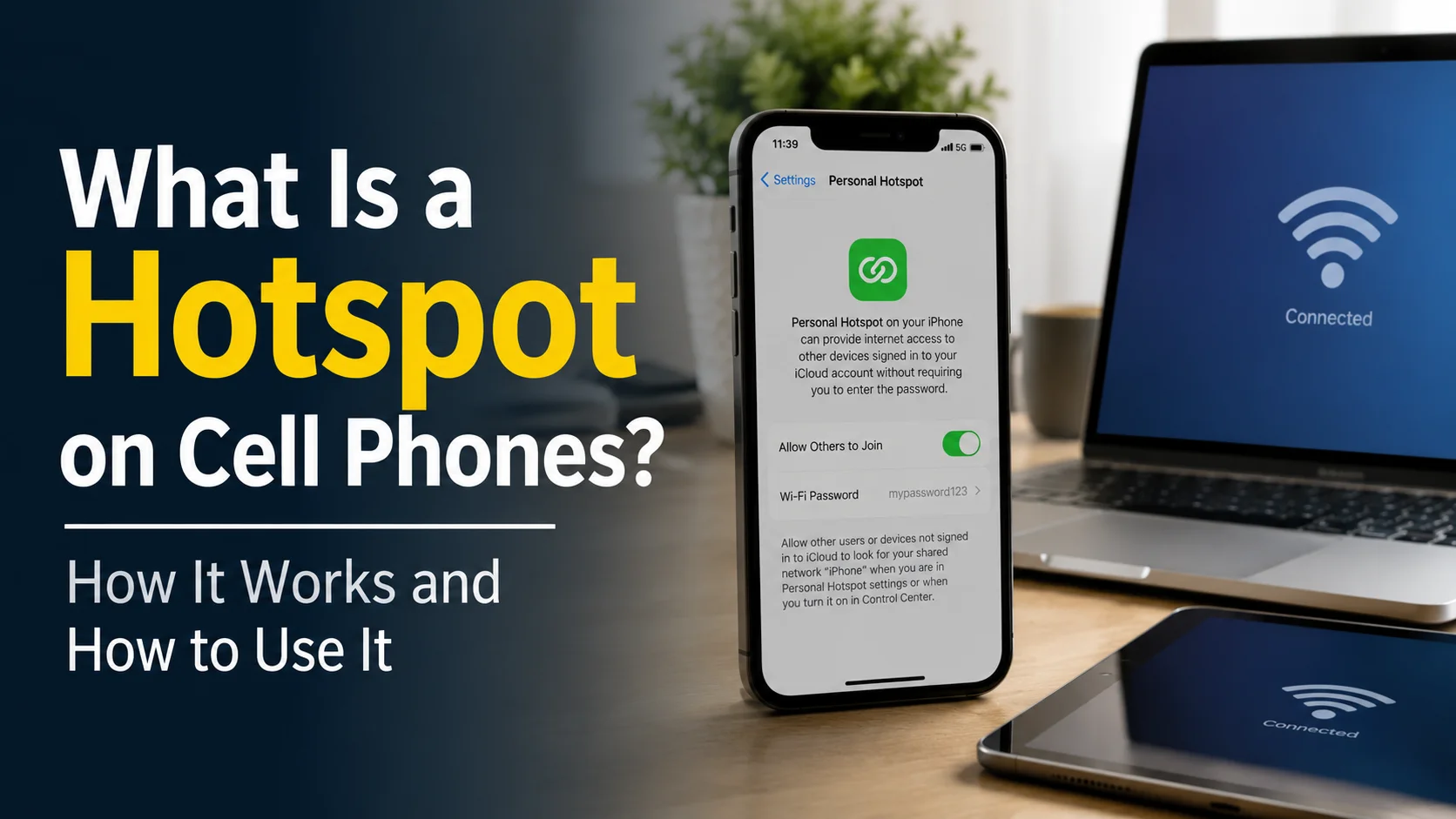
A hotspot on a cell phone is a feature that allows your phone to share its mobile data connection with other devices. When you turn it on, your phone creates a temporary Wi-Fi network that a laptop, tablet, smart TV, or another phone can join using a password.
In simple terms, a mobile hotspot turns your cell phone into a small portable Wi-Fi router.
This feature can be extremely useful when your home internet stops working, you need to connect a laptop while travelling, or you want to avoid using an unsecured public Wi-Fi network.
However, using a phone hotspot can consume mobile data, drain the phone’s battery, and sometimes result in extra charges depending on your mobile plan.
In this guide, you will learn what a hotspot is on a cell phone, how it works, how to turn it on, how much data it uses, how secure it is, and how to solve common hotspot problems.
What Is a Hotspot on a Cell Phone?
A hotspot on a cell phone is a wireless access point created by the phone. It shares the phone’s cellular internet connection with nearby devices through Wi-Fi, Bluetooth, or a USB cable.
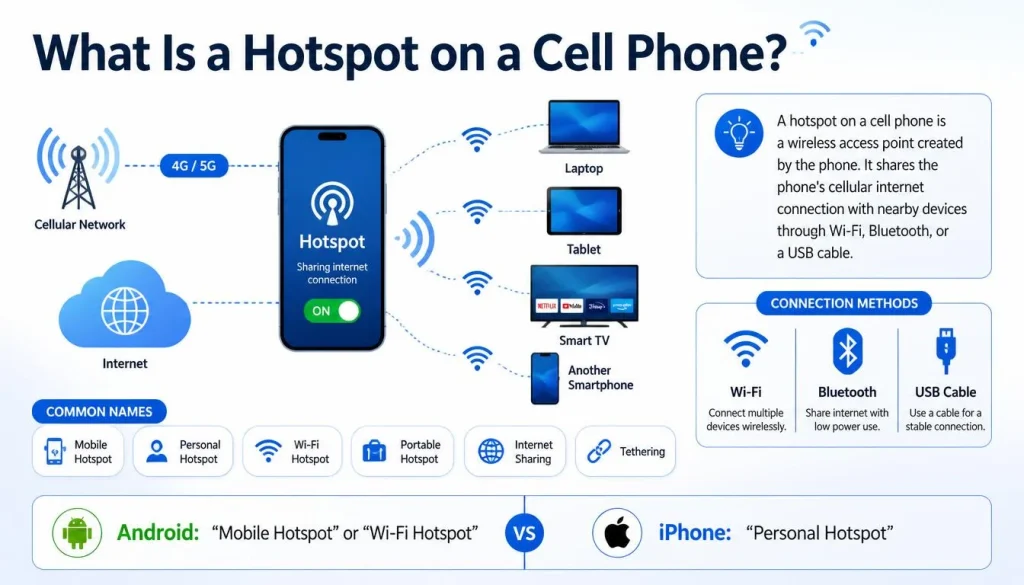
The feature may appear under different names depending on your phone.
Common names include:
- Mobile Hotspot
- Personal Hotspot
- Wi-Fi Hotspot
- Portable Hotspot
- Internet Sharing
- Tethering
Android phones commonly use terms such as “Mobile Hotspot” or “Wi-Fi Hotspot.” On an iPhone, the feature is called “Personal Hotspot.”
Regardless of the name, the basic purpose is the same: sharing your phone’s mobile internet connection with another device.
A Simple Mobile Hotspot Example
Imagine that your home Wi-Fi suddenly stops working, but you need to send an important email from your laptop.
You can turn on the hotspot feature on your phone, open the Wi-Fi settings on your laptop, select your phone’s hotspot name, and enter the password.
Your laptop will then access the internet through your phone’s cellular data connection.
The connection follows this path:
Cell tower → Mobile data → Cell phone → Hotspot network → Connected device
Your phone receives internet access from the mobile network and then shares it with the connected device.
How Does a Cell Phone Hotspot Work?
A cell phone hotspot works by combining two wireless connections.
First, your phone connects to your mobile carrier’s network using 4G LTE, 5G, or another available cellular technology.
Second, the phone creates a small Wi-Fi network that nearby devices can join.
The process usually works like this:
- Your phone connects to a cellular network.
- Mobile data is turned on.
- You enable the hotspot feature.
- Your phone creates a Wi-Fi network name.
- A nearby device finds the network.
- The device enters the hotspot password.
- Internet traffic passes through your phone’s mobile data connection.
Your phone acts as the middle point between the cellular network and the connected device.
The quality of the connection depends on several factors, including mobile signal strength, network congestion, your data plan, the phone model, and the number of connected devices.
Is a Mobile Hotspot the Same as Wi-Fi?
A mobile hotspot is not exactly the same as regular home Wi-Fi, although both allow devices to connect wirelessly.
The main difference is where the internet connection comes from.
Home Wi-Fi normally receives internet through a fixed broadband connection, such as cable, fibre, or DSL. A mobile hotspot normally receives internet through a cellular network.
| Feature | Mobile Hotspot | Home Wi-Fi |
|---|---|---|
| Internet source | Cellular network | Fixed broadband |
| Main device | Smartphone or hotspot device | Router |
| Portability | Highly portable | Usually fixed in one location |
| Data limits | May have strict limits | Often more generous |
| Battery required | Yes, when using a phone | Usually connected to power |
| Best for | Travel, emergencies, temporary access | Everyday home or office use |
A hotspot uses Wi-Fi technology to connect nearby devices, but the internet itself usually comes from mobile data.
What Is the Difference Between Mobile Data and a Hotspot?
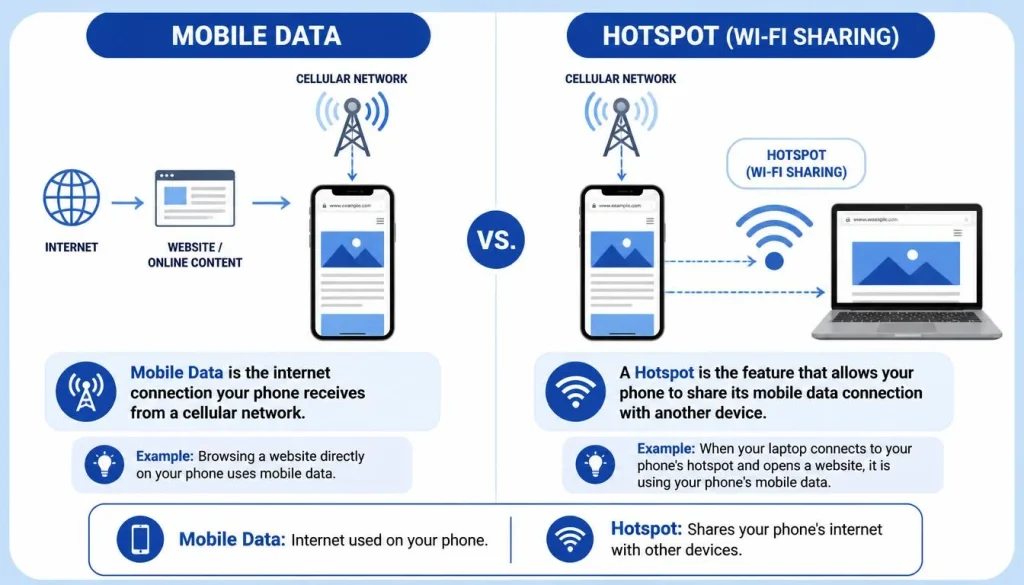
Mobile data is the internet connection your phone receives from a cellular network.
A hotspot is the feature that allows your phone to share that mobile data connection with another device.
For example, when you browse a website directly on your phone, you are using mobile data. When your laptop connects to your phone and opens the same website, the laptop is using your mobile data through the hotspot.
Is a Hotspot the Same as Mobile Data?
No. Mobile data is the internet connection, while the hotspot is the method used to share that connection.
The hotspot normally cannot provide internet access unless your phone has an active internet connection from mobile data or, on some devices, a shared Wi-Fi connection.
Does a Hotspot Work When Mobile Data Is Off?
In most cases, a standard phone hotspot will not provide internet access when mobile data is turned off.
The Wi-Fi hotspot network may still appear on another device, but it may show “connected without internet.”
Some Android phones can share an existing Wi-Fi connection, but this feature is not available on every phone.
What Is the Difference Between Hotspot and Tethering?
Tethering is the general term for sharing a phone’s internet connection with another device.
A Wi-Fi hotspot is one type of tethering.
The three most common tethering methods are:
- Wi-Fi hotspot
- USB tethering
- Bluetooth tethering
| Feature | Wi-Fi Hotspot | USB Tethering | Bluetooth Tethering |
|---|---|---|---|
| Connection type | Wireless | USB cable | Bluetooth |
| Number of devices | Usually multiple | Usually one | Usually one |
| Speed | Fast in good conditions | Often fast and stable | Usually slower |
| Battery use | Can be high | Phone may charge through USB | Moderate |
| Setup | Easy | Requires a cable | Requires Bluetooth pairing |
| Best use | Multiple nearby devices | Stable laptop connection | Light internet use |
Mobile Hotspot vs USB Tethering
A mobile hotspot is more convenient because it does not require a cable and can support several devices.
USB tethering may provide a more stable connection for a laptop. It can also reduce battery drain because the phone may charge while connected.
Mobile Hotspot vs Bluetooth Tethering
Bluetooth tethering generally uses less power than a Wi-Fi hotspot, but it is often slower.
It may be suitable for email, messaging, and light web browsing, but it is not ideal for streaming or large downloads.
Mobile Hotspot vs Public Wi-Fi
A password-protected personal hotspot is often safer than an unknown public Wi-Fi network because you control who can connect.
However, your hotspot still needs a strong password and proper security settings.
What Devices Can Connect to a Phone Hotspot?
Most devices with Wi-Fi capability can connect to a cell phone hotspot.
These may include:
- Laptops
- Tablets
- Smartphones
- Smart TVs
- Streaming devices
- Gaming consoles
- E-readers
- Security cameras
- Some smart-home devices
Compatibility depends on the device, hotspot frequency, security standard, and operating system.
Older devices may have difficulty connecting to a 5 GHz hotspot. Changing the hotspot band to 2.4 GHz may solve the problem.
How Many Devices Can Connect to a Phone Hotspot?
The number of devices that can connect at the same time depends on the phone model, operating system, mobile carrier, and data plan.
Some phones allow only a few devices, while others may support ten or more.
You can usually find the connection limit in your hotspot settings.
Does Connecting More Devices Make the Hotspot Slower?
Yes. All connected devices share the same mobile connection.
If several devices are streaming videos, downloading files, or installing updates, each device may receive a smaller portion of the available speed.
Connecting more devices may also increase battery drain, data consumption, and phone temperature.
Can You Limit the Number of Connected Devices?
Some Android phones allow you to set a maximum number of hotspot connections.
Other phones may only allow you to view and disconnect connected devices.
The exact options vary by manufacturer and operating-system version.
How to Turn On a Hotspot on an Android Phone
The menu names may vary slightly between Samsung, Google Pixel, Motorola, OnePlus, and other Android phones.
The general process is:
- Open Settings.
- Tap Network & Internet, Connections, or a similar option.
- Select Hotspot & Tethering or Mobile Hotspot and Tethering.
- Tap Wi-Fi Hotspot or Mobile Hotspot.
- Review the hotspot name and password.
- Turn on the hotspot.
- Open Wi-Fi settings on the device you want to connect.
- Select your phone’s hotspot name.
- Enter the password.
Some Android phones also provide a hotspot button in the Quick Settings panel. Swipe down from the top of the screen and look for a button labelled “Hotspot” or “Mobile Hotspot.”
How to Find the Hotspot Password on Android
Open your phone’s hotspot settings and look for an option such as:
- Hotspot password
- Network password
- Configure hotspot
- Set up mobile hotspot
You may need to tap an eye-shaped icon to reveal the password.
Use a strong password containing a mixture of letters, numbers, and symbols.
How to Turn On Personal Hotspot on an iPhone
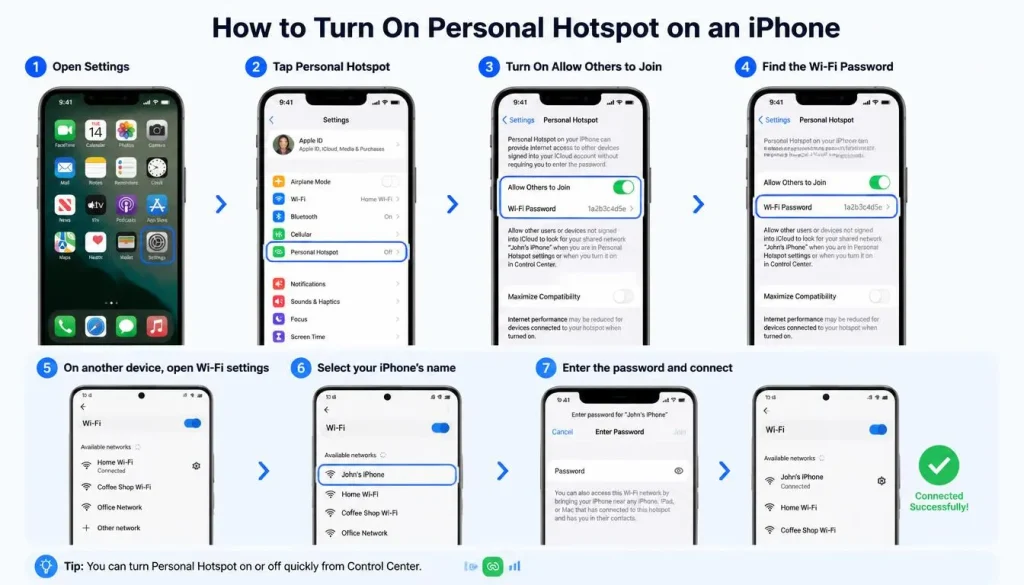
To enable Personal Hotspot on an iPhone:
- Open Settings.
- Tap Personal Hotspot.
- Turn on Allow Others to Join.
- Review the Wi-Fi password shown on the screen.
- Open Wi-Fi settings on the other device.
- Select your iPhone’s name.
- Enter the Personal Hotspot password.
You may also find the Personal Hotspot control in the iPhone Control Centre.
What If Personal Hotspot Is Missing?
If the Personal Hotspot option does not appear:
- Make sure cellular data is turned on.
- Restart the iPhone.
- Check for an iOS update.
- Confirm that your mobile plan supports hotspot use.
- Check for updated carrier settings.
- Contact your mobile provider.
Some carriers do not include hotspot access in every mobile plan.
How to Connect a Device to Your Phone’s Hotspot
After turning on the hotspot, you must connect the second device to it.
Connect a Laptop Through Wi-Fi
On the laptop:
- Open Wi-Fi settings.
- View available wireless networks.
- Select your phone’s hotspot name.
- Enter the hotspot password.
- Wait for the connection to complete.
- Open a website to test the internet.
Connect Another Phone or Tablet
On the second phone or tablet:
- Open Settings.
- Select Wi-Fi.
- Find the hotspot network.
- Tap the network name.
- Enter the password.
- Tap Connect.
Connect Using USB Tethering
To connect a computer using USB:
- Connect the phone to the computer with a compatible USB cable.
- Open the phone’s hotspot or tethering settings.
- Turn on USB Tethering.
- Wait for the computer to recognise the connection.
USB tethering usually works with one computer at a time.
Connect Using Bluetooth Tethering
To use Bluetooth tethering:
- Pair the phone with the other device through Bluetooth.
- Open the phone’s tethering settings.
- Turn on Bluetooth Tethering.
- Select the phone as the internet source on the connected device.
Bluetooth tethering may be slower than Wi-Fi or USB tethering.
Can a Phone Hotspot Work Without Mobile Data or Cell Service?
A standard mobile hotspot normally requires an active cellular data connection.
Without mobile service, the phone can create a local Wi-Fi network, but connected devices may not have internet access.
Can You Use a Hotspot Without a SIM Card?
A phone without a SIM card may still create a hotspot network, but it will not normally provide cellular internet.
However, some phones can share an existing Wi-Fi connection. In that situation, a SIM card may not be necessary.
Can a Phone Share an Existing Wi-Fi Connection?
Some Android phones support Wi-Fi sharing or repeater-style hotspot features.
This allows the phone to connect to a Wi-Fi network and share that connection with another device.
Not every phone supports this feature, and iPhone Personal Hotspot generally focuses on sharing cellular data.
Will a Hotspot Work in Airplane Mode?
Airplane mode normally disables cellular and wireless connections.
On some phones, you may be able to manually turn Wi-Fi back on after enabling airplane mode. However, cellular hotspot access will not work if the cellular connection remains disabled.
The result depends on the phone and operating system.
Does Using a Hotspot Use Mobile Data?
Yes. A phone hotspot normally uses the mobile data included in your cellular plan.
Every website, video, download, update, or online activity performed by the connected device can count towards your data allowance.
For example, if your laptop downloads a 2 GB software update while connected to your hotspot, approximately 2 GB may be deducted from your mobile data allowance.
Does a Hotspot Use More Data Than Normal Phone Use?
The hotspot itself does not necessarily use more data for the same online activity.
However, laptops and tablets often perform more background tasks than phones. These tasks may include:
- Operating-system updates
- Cloud backups
- Email synchronisation
- Antivirus updates
- Browser tab refreshing
- App downloads
- Automatic photo uploads
- Video autoplay
Because of these background activities, hotspot data can disappear more quickly than expected.
What Uses the Most Hotspot Data?
| Online activity | Typical data impact |
|---|---|
| Text-based email | Very low |
| General web browsing | Low |
| Social media browsing | Low to moderate |
| Music streaming | Moderate |
| Video calling | Moderate to high |
| HD video streaming | High |
| 4K video streaming | Very high |
| Large game downloads | Very high |
| Software updates | Very high |
| Cloud backups | Very high |
Actual data usage depends on video quality, app settings, file size, session length, and the connected device.
How Long Will 1 GB of Hotspot Data Last?
There is no universal answer because usage varies widely.
One gigabyte may last a long time for email and basic browsing, but it can disappear quickly during HD video streaming, large downloads, or video calls.
To conserve data, reduce video quality, pause cloud syncing, disable automatic updates, and avoid downloading large files.
Does a Hotspot Use Data When Nothing Is Connected?
An active hotspot usually uses little or no internet data when no device is connected.
However, keeping the feature on can still consume battery power.
When a device is connected but appears inactive, background apps may continue to use data.
Does a Mobile Hotspot Cost Extra?
Whether a hotspot costs extra depends on your mobile carrier and plan.
Possible arrangements include:
- Hotspot use included in the regular data allowance
- A separate hotspot data allowance
- Reduced speed after reaching a limit
- Extra charges for additional data
- Hotspot access available only on selected plans
- Restrictions while using international roaming
Even if your plan is advertised as unlimited, high-speed hotspot usage may still have a separate limit.
Check your mobile provider’s app, website, or account information before using a hotspot heavily.
Hotspot Data vs Regular Mobile Data
Some plans combine hotspot data and normal phone data into one allowance.
Other plans separate them.
For example, you may have unlimited data on your phone but only a limited amount of high-speed hotspot data.
Can You Use a Hotspot with an Unlimited Data Plan?
Usually, yes, but “unlimited” does not always mean unlimited high-speed hotspot use.
Your provider may reduce hotspot speed after you reach a certain amount of usage.
Read the plan details carefully.
Does a Hotspot Work While Roaming?
A hotspot may work while roaming if your carrier allows mobile data in the country you are visiting.
However, roaming charges can be expensive. Large downloads, streaming, and software updates may create significant costs.
Check your international roaming plan before turning on a hotspot abroad.
How Fast Is a Cell Phone Hotspot?
Hotspot speed depends on the speed of your phone’s cellular connection.
A strong 5G connection may provide fast hotspot performance. A weak or congested 4G connection may feel slow.
Important speed factors include:
- Cellular signal strength
- 4G or 5G availability
- Network congestion
- Carrier speed limits
- Remaining high-speed data
- Phone hardware
- Hotspot frequency band
- Distance between devices
- Number of connected devices
- Background downloads
Is a 5G Hotspot Faster Than 4G?
A 5G hotspot can be faster than a 4G hotspot when strong 5G coverage is available.
However, 5G performance varies by location. A stable 4G connection may sometimes perform better than a weak 5G connection.
Why Is My Phone Hotspot Slow?
Common reasons include:
- Weak cellular signal
- Network congestion
- Too many connected devices
- Reduced speed after reaching a data limit
- Large background downloads
- Excessive distance between devices
- Interference from nearby Wi-Fi networks
- Phone overheating
- Power-saving settings
How to Improve Mobile Hotspot Speed
Try the following steps:
- Move the phone near a window or open area.
- Disconnect devices you are not using.
- Pause automatic updates and cloud backups.
- Restart the phone.
- Turn airplane mode on and off.
- Switch between 4G and 5G if your phone allows it.
- Try the 5 GHz band at close range.
- Try the 2.4 GHz band for better range.
- Use USB tethering for a laptop.
- Check whether your carrier has reduced your speed.
How Far Does a Phone Hotspot Reach?
A phone hotspot is designed for short-range use.
The reliable range may vary depending on the phone, frequency band, walls, interference, and nearby wireless networks.
For the best performance, keep the connected device in the same room as the phone.
What Affects Hotspot Range?
Hotspot range may be reduced by:
- Thick walls
- Metal objects
- Floors between devices
- Other Wi-Fi networks
- Bluetooth interference
- Weak phone hardware
- Low battery settings
- A crowded wireless environment
Should You Use 2.4 GHz or 5 GHz?
A 2.4 GHz hotspot usually offers better range and greater compatibility with older devices.
A 5 GHz hotspot can provide faster performance and less interference at shorter distances.
Use 2.4 GHz when the connected device is farther away. Use 5 GHz when the device is close and supports the frequency.
How to Manage Your Mobile Hotspot
Hotspot management helps you protect your data, control access, and improve performance.
How to Find or Change the Hotspot Password
Open the hotspot settings on your phone and select the password option.
Create a strong password that is difficult to guess. Avoid using your name, phone number, date of birth, or simple combinations such as “12345678.”
How to Change the Hotspot Name
The hotspot name is also called the network name or SSID.
Android phones usually allow you to change it directly in the hotspot settings.
On an iPhone, the Personal Hotspot name normally matches the device name. You can change it through the iPhone’s general device-name settings.
Avoid including private information in your hotspot name.
How to See Who Is Connected to Your Hotspot
Many Android phones show connected devices inside the Mobile Hotspot settings or notification panel.
Some phones display the device name, connection time, or network address.
iPhones may show the number of active Personal Hotspot connections, although detailed device information may be limited.
How to Disconnect or Block an Unknown Device
If you see an unfamiliar connection:
- Turn off the hotspot.
- Change the hotspot password.
- Turn the hotspot back on.
- Reconnect only trusted devices.
- Use the block-device option if your phone provides one.
Changing the password disconnects devices that do not know the new password.
What Does the Hotspot Icon Mean on a Phone?
The hotspot icon indicates that your phone’s hotspot feature is active.
Its appearance varies between phones. It may look like linked circles, curved signal lines, or a small wireless symbol.
How to Know Whether Your Hotspot Is Active
You can check:
- The status bar
- The notification panel
- Quick Settings
- Control Centre
- The hotspot settings screen
Your phone may also show a notification when one or more devices are connected.
How to Know Whether a Device Is Connected
Some phones display the number of connected devices beside the hotspot icon.
You can also open the hotspot settings and review the connected-device section.
Is It Safe to Use a Hotspot on Your Phone?
A properly secured personal hotspot is generally safe for normal use.
It may be safer than an unknown public Wi-Fi network because you control the network and its password.
However, an unsecured or weakly protected hotspot can allow strangers to use your data connection.
How to Secure Your Mobile Hotspot
Follow these security practices:
- Use WPA2 or WPA3 security when available.
- Create a long, unique password.
- Do not use an open hotspot without a password.
- Avoid sharing the password publicly.
- Review connected devices regularly.
- Disconnect unknown users.
- Change the password after sharing it temporarily.
- Keep your phone’s software updated.
- Turn off the hotspot when you finish using it.
- Avoid using personal details in the hotspot name.
Can Someone Access Your Phone Through Your Hotspot?
Connecting to your hotspot does not automatically give another person access to your photos, messages, or files.
However, allowing unknown devices onto your network can create security risks.
Keep file-sharing features disabled unless needed, use a strong password, and avoid accepting unexpected connection requests.
Is a Phone Hotspot Safer Than Public Wi-Fi?
A secured personal hotspot is often safer than an open public Wi-Fi network because fewer people can access it.
However, no network is completely risk-free.
Use secure websites, keep your software updated, and avoid sharing sensitive information on unfamiliar devices.
Does Using a Hotspot Drain Your Battery?
Yes. A hotspot can drain your phone’s battery faster than normal use.
The phone must maintain a cellular connection while also broadcasting a Wi-Fi network. This requires additional power.
Battery drain may increase when:
- Several devices are connected
- The cellular signal is weak
- Large files are being downloaded
- Video is being streamed
- The phone is using 5G
- The hotspot remains on for a long time
How to Reduce Battery Drain
To save battery:
- Connect the phone to a charger.
- Disconnect unused devices.
- Turn off the hotspot when finished.
- Keep the phone in an area with a strong signal.
- Reduce heavy internet activity.
- Use USB tethering when connecting a laptop.
- Avoid covering the phone while it is warm.
- Enable automatic hotspot shut-off when available.
Why Does My Hotspot Keep Turning Off Automatically?
Many phones automatically turn off the hotspot when no device has been connected for a certain period.
This feature helps save battery.
Other possible causes include:
- Battery Saver
- Data Saver
- Overheating
- Weak cellular service
- Carrier restrictions
- Software problems
- Automatic hotspot timeout settings
Why Can’t I Use Hotspot While Data Saver Is On?
Some Android phones restrict tethering when Data Saver is active.
Turn off Data Saver temporarily and try enabling the hotspot again.
How to Stop a Hotspot From Disconnecting
Try these solutions:
- Disable automatic hotspot shut-off.
- Turn off Battery Saver.
- Turn off Data Saver.
- Keep the phone connected to power.
- Move the phone to an area with better signal.
- Restart both devices.
- Forget the hotspot network and reconnect.
- Update the phone’s software.
- Reset network settings as a final option.
When Should You Use a Cell Phone Hotspot?
A phone hotspot is useful for:
- Working during a home internet outage
- Connecting a laptop while travelling
- Using a tablet without a SIM card
- Accessing the internet in a hotel
- Avoiding unsecured public Wi-Fi
- Attending an online meeting
- Sending urgent emails
- Providing temporary internet to another person
- Using internet access during an emergency
When Should You Avoid Using It?
A phone hotspot may not be the best option for:
- Large software downloads
- Frequent cloud backups
- 4K video streaming
- Long gaming sessions
- Heavy daily remote work
- Areas with weak cellular service
- Limited mobile data plans
- International roaming without a suitable package
- Situations where the phone is overheating
Advantages and Disadvantages of a Phone Hotspot
| Advantages | Disadvantages |
|---|---|
| Portable internet access | Uses mobile data |
| Easy to set up | Drains the battery |
| No separate router required | May cause overheating |
| Useful during internet outages | Speed depends on cellular coverage |
| Can connect several devices | Carrier limits may apply |
| Often safer than open public Wi-Fi | Large downloads can be expensive |
| Useful for travel | Performance may be inconsistent |
Phone Hotspot vs Dedicated Mobile Hotspot
A dedicated mobile hotspot is a separate portable device designed specifically for sharing cellular internet.
It normally contains its own SIM card, battery, and data plan.
| Feature | Phone Hotspot | Dedicated Hotspot |
|---|---|---|
| Extra device required | No | Yes |
| Separate data plan | Usually no | Often yes |
| Battery life | Limited | Often longer |
| Number of connections | Varies | Often supports more |
| Phone remains free | No | Yes |
| Best for | Occasional use | Frequent or professional use |
Who Should Use a Phone Hotspot?
A phone hotspot is ideal for:
- Occasional travellers
- Emergency internet access
- Light laptop use
- Connecting one or two devices
- People who do not need a separate hotspot plan
Who Should Buy a Dedicated Hotspot?
A dedicated hotspot may be better for:
- Frequent travellers
- Remote workers
- Families connecting several devices
- Long working sessions
- People who want to preserve their phone battery
- Users who need a separate internet connection
Why Is My Mobile Hotspot Not Working?
Hotspot problems may be caused by your phone, connected device, carrier, or network conditions.
Hotspot Is On but There Is No Internet
Try the following:
- Confirm that mobile data is turned on.
- Check whether websites open directly on the phone.
- Review your remaining data allowance.
- Check cellular signal strength.
- Turn the hotspot off and on.
- Restart the phone.
- Restart the connected device.
- Confirm that your plan supports hotspot use.
- Check for carrier or network outages.
- Contact your provider if the problem continues.
Laptop Cannot Find the Phone Hotspot
Possible solutions include:
- Move the phone closer.
- Turn the laptop’s Wi-Fi off and on.
- Restart both devices.
- Change the hotspot band to 2.4 GHz.
- Make sure the hotspot is discoverable.
- Rename the hotspot.
- Update the laptop’s Wi-Fi driver.
- Forget old network settings.
Hotspot Password Is Not Working
Check that:
- You entered the password exactly.
- Capital letters are correct.
- There are no accidental spaces.
- The connected device has forgotten the old password.
- The hotspot security setting is compatible.
You can also create a new password and reconnect.
Connected Device Keeps Disconnecting
Possible causes include:
- Weak signal
- Battery Saver
- Automatic hotspot timeout
- Phone overheating
- Network congestion
- Outdated software
- Distance between devices
Keep the phone close, connected to power, and in a well-ventilated area.
Android Hotspot Keeps Turning Off
Open the hotspot settings and look for options such as:
- Turn off hotspot automatically
- Timeout settings
- Battery optimisation
- Data Saver
- Power-saving mode
Disable the relevant setting and test the connection again.
Frequently Asked Questions About What Is a Hotspot on Cell Phones
What does hotspot mean on a cell phone?
A hotspot is a feature that allows a cell phone to share its mobile internet connection with another device. The phone creates a temporary Wi-Fi network that a laptop, tablet, or another phone can join using a password.
Is a hotspot free to use?
The feature itself may be included with your phone, but the data it uses may not be free. Your carrier may count hotspot usage against your data allowance, impose a separate limit, reduce speed, or charge extra.
Does a hotspot use Wi-Fi or mobile data?
A phone hotspot usually uses mobile data for internet access and Wi-Fi to connect nearby devices. Some Android phones may also share an existing Wi-Fi connection.
Can I use my phone as a hotspot without Wi-Fi?
Yes. A phone hotspot is commonly used when regular Wi-Fi is unavailable. It normally shares the phone’s cellular data connection.
Can a hotspot work without cellular service?
A hotspot network may still appear, but it will not normally provide internet access without cellular service or another internet source.
Does hotspot data count as regular data?
It depends on your mobile plan. Some carriers combine hotspot and regular mobile data, while others provide a separate hotspot allowance.
Can I use my phone while the hotspot is on?
Yes. You can usually browse, send messages, and use apps while the hotspot is active. Heavy phone use may reduce performance and increase battery drain.
Can I make calls while using a mobile hotspot?
In most modern networks, you can make calls while using a hotspot. However, performance may depend on your carrier, phone, network technology, and signal strength.
Will a phone call disconnect the hotspot?
Normally, it should not. However, older networks, weak coverage, or carrier limitations may interrupt the data connection during a call.
How many devices can connect to my phone hotspot?
The limit depends on the phone model, operating system, and carrier. Some phones support only a few devices, while others support ten or more.
Is it safe to leave my hotspot on?
It is better to turn it off when you are not using it. Leaving it active can drain the battery and may allow unwanted connection attempts.
Can someone see what I do through their hotspot?
The hotspot owner may be able to see connected devices and overall data usage. They may not automatically see every activity, but you should avoid sending sensitive information over a network you do not trust.
Why does a hotspot drain the battery so fast?
The phone must maintain a cellular connection and broadcast a Wi-Fi signal at the same time. Streaming, weak signal, multiple devices, and 5G use can increase battery drain.
Is USB tethering better than a Wi-Fi hotspot?
USB tethering may be faster, more stable, and better for battery life when connecting one computer. A Wi-Fi hotspot is more convenient and can support multiple devices.
Can I connect a smart TV to my phone hotspot?
Yes, if the TV supports Wi-Fi. However, video streaming can consume a large amount of mobile data, especially at HD or 4K quality.
Why is my mobile hotspot so slow?
Weak cellular signal, network congestion, carrier speed limits, too many connected devices, background downloads, or phone overheating can reduce hotspot speed.
Does a hotspot work internationally?
It may work if mobile data roaming is active and supported by your carrier. Check roaming charges and data limits before using a hotspot abroad.
Final Thoughts
A hotspot on a cell phone is a practical feature that turns your phone into a portable internet source for laptops, tablets, and other Wi-Fi devices.
It is useful during internet outages, travel, remote work, and emergencies. However, hotspot use can consume mobile data quickly, drain the battery, reduce phone performance, and create extra costs depending on your plan.
For the best experience, use a strong password, monitor connected devices, check your data allowance, keep the phone close to the connected device, and turn off the hotspot when you no longer need it.
A phone hotspot is an excellent solution for occasional internet access. For frequent heavy use or multiple connected devices, a dedicated mobile hotspot or fixed broadband connection may be more suitable.

Daniel Mitchell is a home appliances specialist with over a decade of hands-on experience testing, reviewing, and comparing everyday household products. He focuses on helping homeowners make smarter buying decisions through practical insights, real-world testing, and easy-to-understand advice. Daniel covers everything from kitchen appliances to smart home solutions, with a strong emphasis on performance, energy efficiency, and long-term reliability.