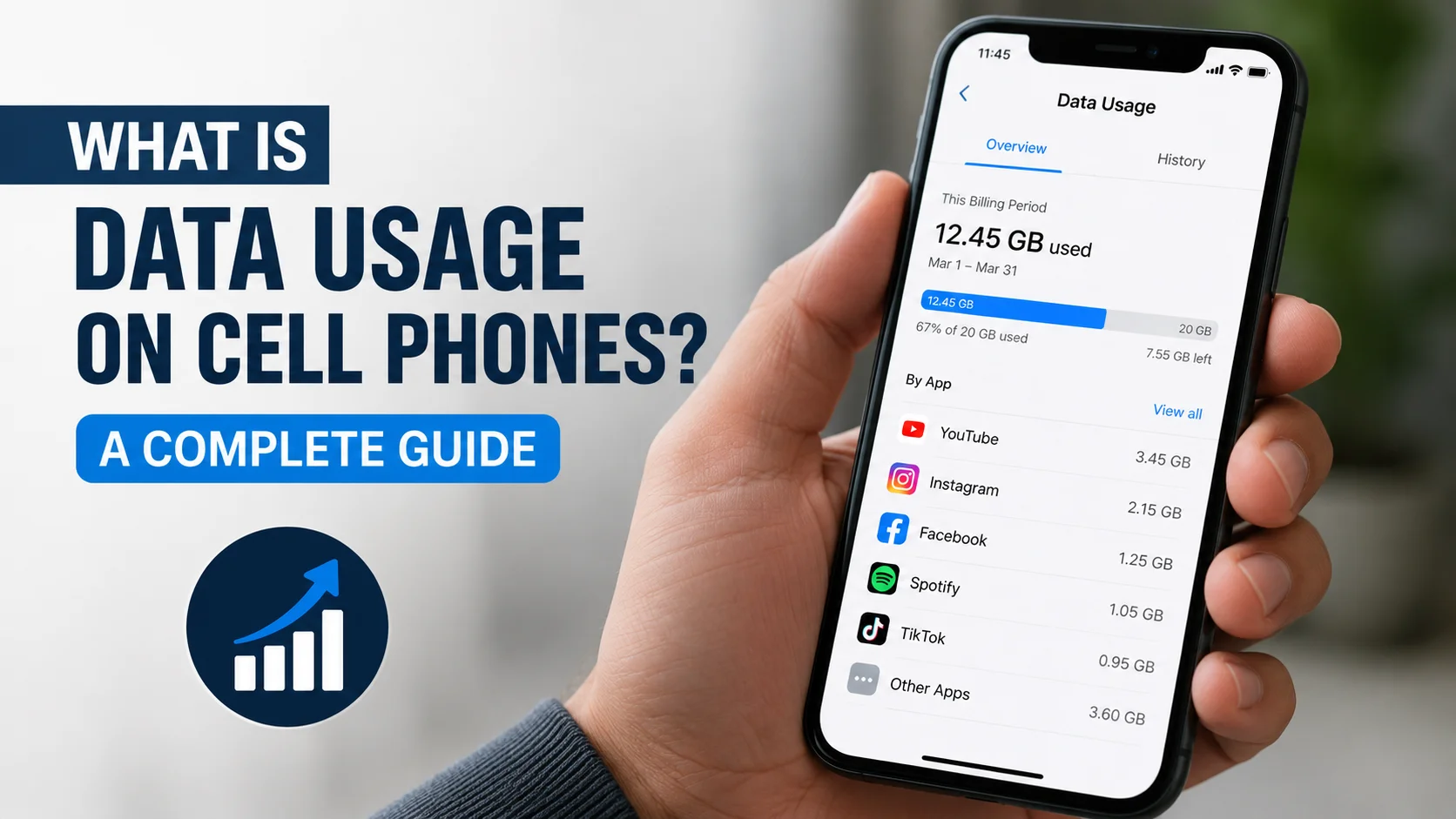
Data usage on cell phones is the amount of internet data your phone sends and receives through a mobile or cellular network. Activities such as browsing websites, streaming videos, using social media, making video calls, downloading apps and backing up photos can all use mobile data.
Your phone normally uses mobile data when Wi-Fi is unavailable or when your device switches from a weak Wi-Fi connection to the cellular network. Your mobile provider records this usage against your monthly data allowance.
Understanding what counts as data usage can help you avoid unexpected charges, choose the right phone plan and identify apps that are consuming data in the background.
What Is Data Usage on Cell Phones?
Cell phone data usage refers to the information your phone uploads or downloads while connected to your mobile provider’s network.
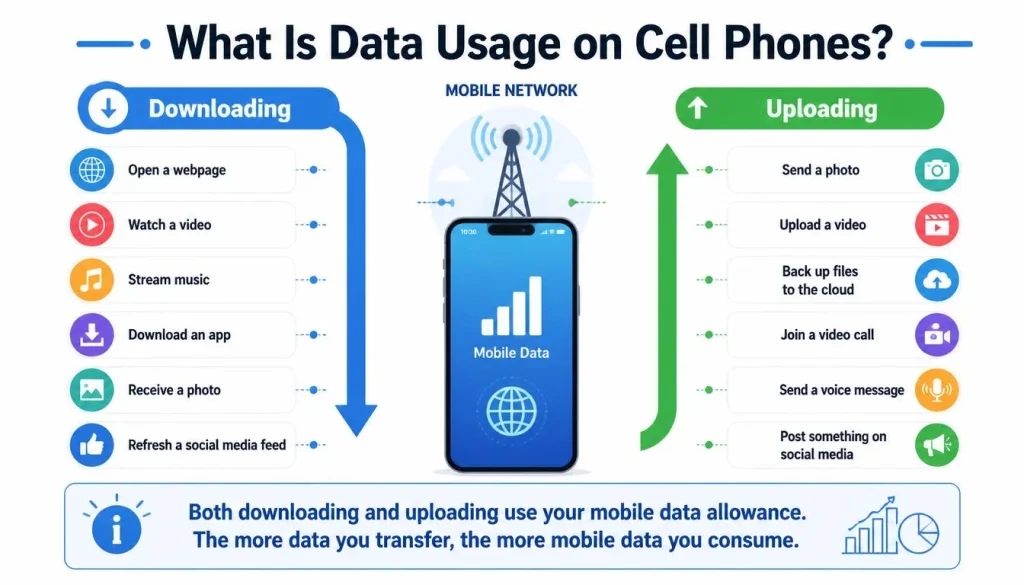
Downloading happens when your phone receives information, such as when you:
- Open a webpage
- Watch a video
- Stream music
- Download an app
- Receive a photo
- Refresh a social media feed
Uploading happens when your phone sends information, such as when you:
- Send a photo
- Upload a video
- Back up files to the cloud
- Join a video call
- Send a voice message
- Post something on social media
Both uploading and downloading count towards your mobile data usage. Google defines data usage as the amount of information a phone uploads or downloads through mobile data.
What Does Data Mean on a Phone?
The word “data” refers to digital information transferred between your phone and an online service.
For example, when you open a news website, your phone downloads text, images, advertisements and other page elements. When you upload a photo to Instagram, your phone sends that image from your device to Instagram’s servers.
The larger the file or the higher the media quality, the more data is normally required.
How Does Mobile Data Work?
Your phone connects to a nearby cellular tower using a 4G LTE or 5G network. The mobile provider then connects your phone to the internet.
Every time an app sends or receives online information through this connection, some of your mobile data allowance is used.
Mobile data, cellular data and cell phone data generally refer to the same type of internet connection. Different phones and providers may use different wording in their settings.
How Is Cell Phone Data Measured?
Cell phone data is normally measured in kilobytes, megabytes and gigabytes.
- KB: Kilobyte
- MB: Megabyte
- GB: Gigabyte
- TB: Terabyte
For everyday mobile plan comparisons:
- Approximately 1,000 KB equals 1 MB
- Approximately 1,000 MB equals 1 GB
- Approximately 1,000 GB equals 1 TB
A text-only email may use only a small amount of data. A high-definition movie may use several gigabytes.
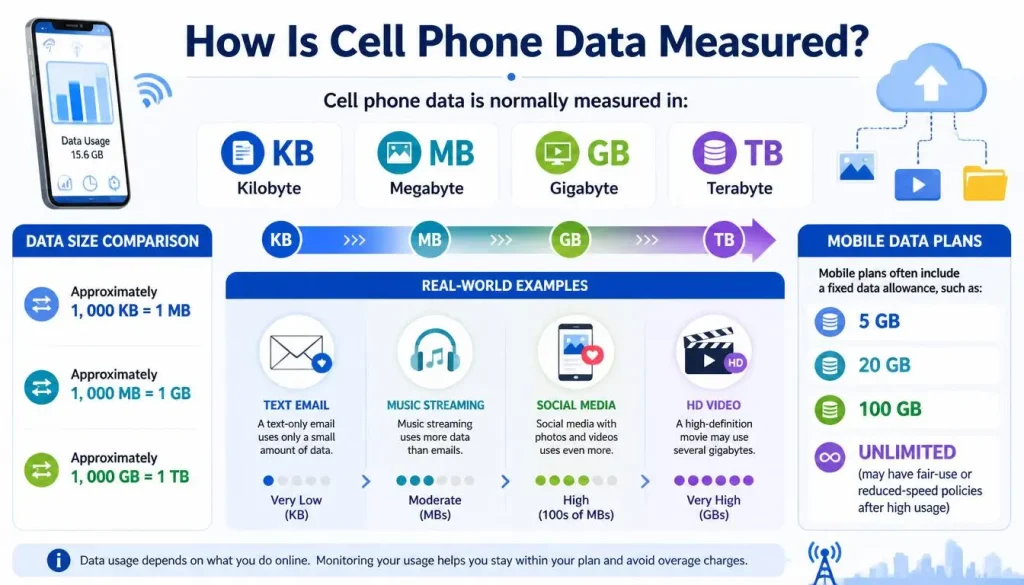
Your mobile plan may include a fixed allowance, such as 5 GB, 20 GB or 100 GB per billing cycle. Some plans are described as unlimited but may reduce connection speeds after a certain amount of high-speed data has been used.
What Counts as Data Usage on a Cell Phone?
Almost any activity that requires an internet connection can use mobile data when Wi-Fi is not available.
Web Browsing and Online Searches
Opening websites, searching Google, reading online articles and loading images all require data.
Simple text pages generally use less data than pages containing:
- Large photographs
- Auto-playing videos
- Interactive maps
- Advertisements
- Animations
- Downloadable files
Opening multiple browser tabs can also increase usage because some websites continue refreshing content in the background.
Sending and receiving text-only emails normally uses very little data. Usage increases when an email contains:
- Large attachments
- Photographs
- PDF files
- Videos
- Presentation files
- Automatically loaded images
Downloading a 20 MB email attachment will use approximately the size of the transferred file, with a small amount of additional network overhead.
Social Media
Apps such as Facebook, Instagram, TikTok, Snapchat, Reddit and X can use significant amounts of data.
Social media usage increases when you:
- Watch short-form videos
- Scroll through image-heavy feeds
- Upload photos or videos
- View live streams
- Use video autoplay
- Send media through direct messages
- Allow content to preload
TikTok, Instagram Reels, Facebook videos and similar feeds can consume data quickly because the next videos may begin loading before you watch them.
Video Streaming
Video streaming is one of the most data-intensive activities on a cell phone.
The amount used depends on:
- Video resolution
- Streaming platform
- Length of viewing
- Compression
- Device settings
- Network speed
- Automatic quality selection
Netflix states that video usage can range from up to 0.3 GB per hour at low quality to up to 3 GB per hour for high-definition viewing and up to 7 GB per hour for ultra-high-definition content.
Watching videos in standard definition instead of HD or 4K can therefore make a major difference to your monthly usage.
Music and Podcast Streaming
Music generally uses less data than video, but several hours of daily listening can still add up.
Spotify’s mobile audio quality options range from approximately 24 kbit/s at low quality to approximately 320 kbit/s at very high quality. Spotify also confirms that higher streaming quality uses more data.
Based on those bitrates, one hour of music may use roughly:
- 11 MB at 24 kbit/s
- 43 MB at 96 kbit/s
- 72 MB at 160 kbit/s
- 144 MB at 320 kbit/s
Actual usage can vary because of caching, advertisements, track changes and app behaviour.
Voice and Video Calls
Internet-based calls use data when they are made over the mobile network.
Examples include:
- FaceTime
- Facebook Messenger
- Zoom
- Microsoft Teams
- Google Meet
- Skype
- Telegram calls
A voice-only call normally uses less data than a video call. Video calls must continuously upload your camera feed while downloading the other participant’s video and audio.
A traditional call placed through your mobile provider’s calling service is normally handled differently from an app-based internet call. Your provider’s plan determines how it is billed.
Maps and Navigation
Navigation apps can use data to download:
- Maps
- Traffic conditions
- Route changes
- Business information
- Search results
- Public transport updates
- Road closures
The GPS positioning system itself can determine your location without a mobile data connection. However, online map images, live traffic and updated route information generally require internet access.
Google Maps allows users to download supported areas in advance and navigate with those maps while offline.
Online Gaming
Playing an online game can use mobile data, but the amount varies widely.
Basic multiplayer games may use relatively little data during gameplay. Usage can be much higher when you:
- Download the game
- Install updates
- Download additional maps
- Use in-game voice chat
- Stream a game from the cloud
- Watch video advertisements
- Download high-resolution game assets
A large game installation or update can use several gigabytes in a single session.
App Downloads and Updates
Downloading an app uses mobile data when the download takes place through the cellular network.
The same applies to:
- App updates
- Operating system updates
- Security updates
- Additional app content
- Language packs
- Offline media downloads
Most modern phones allow you to restrict large downloads and updates to Wi-Fi.
Cloud Backups and File Syncing
Cloud services can use considerable data, especially when they automatically upload photos and videos.
Common examples include:
- iCloud
- Google Photos
- Google Drive
- Dropbox
- Microsoft OneDrive
A video recorded in high resolution may be hundreds of megabytes or several gigabytes. If it is backed up using mobile data, the upload counts towards your allowance.
Personal Hotspot and Tethering
A personal hotspot allows another device to use your phone’s mobile connection.
The connected device may be a:
- Laptop
- Tablet
- Television
- Games console
- Another phone
All internet activity performed by the connected device can count towards your mobile or hotspot allowance.
A hotspot does not automatically multiply data usage. However, computers and televisions may load desktop websites, stream higher-quality video, download system updates or sync large cloud folders. This can cause hotspot data to disappear much faster than expected.
Mobile providers may also apply a separate high-speed hotspot allowance, even when the main phone plan is described as unlimited.
Do Both Uploads and Downloads Use Mobile Data?
Yes. Both uploads and downloads count as data usage.
Examples of downloads include:
- Watching a video
- Loading a website
- Receiving an email attachment
- Installing an app
- Downloading a podcast
Examples of uploads include:
- Sending photos
- Posting videos
- Uploading documents
- Backing up files
- Sharing your camera during a video call
Video calling uses data in both directions at the same time because your phone uploads your audio and video while downloading information from the other participants.
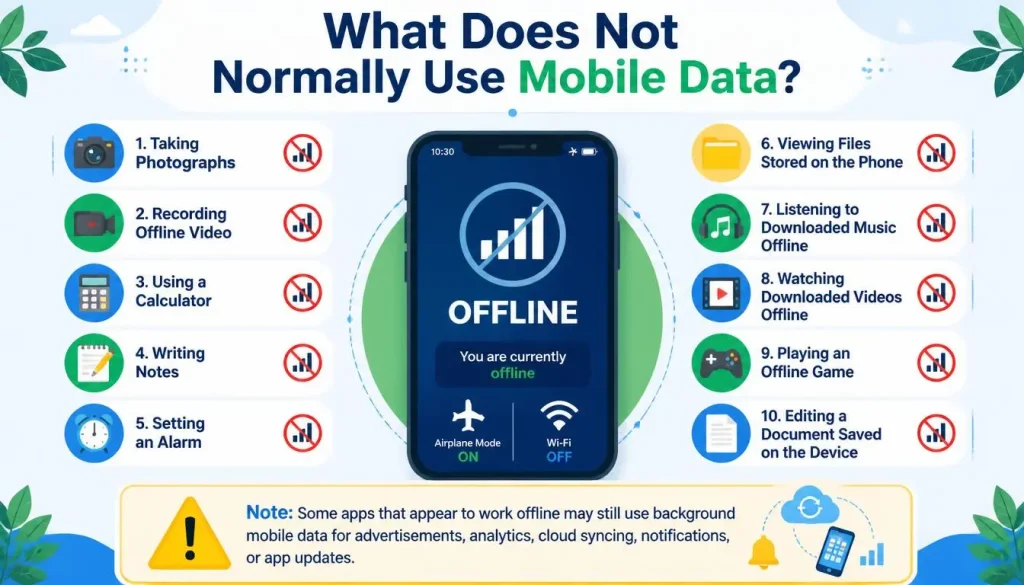
What Does Not Normally Use Mobile Data?
Activities that do not require an internet connection generally do not use mobile data.
Examples include:
- Taking photographs
- Recording offline video
- Using a calculator
- Writing notes
- Setting an alarm
- Viewing files stored on the phone
- Listening to downloaded music offline
- Watching downloaded videos offline
- Using an offline game
- Editing a document saved on the device
However, an offline-looking app may still use background data for advertisements, analytics, cloud syncing, notifications or updates.
Does Texting Use Data?
It depends on the type of message.
SMS Messages
Traditional SMS text messages normally use your provider’s messaging network rather than your mobile internet allowance.
MMS Messages
MMS messages can contain photographs, audio or video. How MMS is counted depends on your provider and plan.
RCS Messages
RCS messages can use either Wi-Fi or mobile data. Google confirms that RCS chats send messages through Wi-Fi and mobile data and can support high-resolution images, files, typing indicators and read receipts.
iMessage and Messaging Apps
Services such as iMessage, WhatsApp, Messenger, Telegram and Signal require an internet connection. They can use mobile data when Wi-Fi is unavailable.
Text-only messages use very little data. Photos, videos, voice notes and large files use more.
Do Regular Phone Calls Use Mobile Data?
Traditional cellular calls do not normally reduce your standard internet data allowance in the same way as app-based calls.
However, the answer can vary when you use:
- Wi-Fi Calling
- Voice over LTE
- FaceTime Audio
- Messenger
- Google Meet
- Other internet calling apps
For billing purposes, check how your provider classifies voice calls and mobile data under your specific plan.
Does Wi-Fi Count as Mobile Data Usage?
Normally, internet activity completed through a Wi-Fi network does not count towards your phone plan’s mobile data allowance.
When your phone is connected to Wi-Fi, apps should generally use that connection instead of the cellular network.
However, mobile data may still be used in certain situations.
Why Is My Phone Using Data While Connected to Wi-Fi?
Possible reasons include:
- The Wi-Fi signal is weak
- The phone temporarily disconnects from Wi-Fi
- A network-assistance feature switches to cellular data
- The Wi-Fi network has no working internet connection
- An app begins downloading before Wi-Fi connects
- A dual-SIM setting selects a different data connection
- You are connected to another phone’s cellular hotspot
On iPhone, Wi-Fi Assist can automatically switch to cellular data when the Wi-Fi connection is poor. Apple states that the feature is enabled by default, although it can be disabled in the Mobile Data or Cellular settings.
Mobile Data vs Wi-Fi
| Feature | Mobile Data | Wi-Fi |
|---|---|---|
| Connection source | Mobile provider’s cellular network | Router or wireless hotspot |
| Coverage | Available wherever the provider has service | Limited to the Wi-Fi network’s range |
| Allowance | May have a monthly limit | Depends on the broadband plan |
| Mobility | Designed for use while travelling | Normally tied to a location |
| Speed | Depends on signal, congestion, 4G or 5G | Depends on broadband speed and router quality |
| Cost | Included in the mobile plan | Included in the internet or hotspot service |
| Roaming risk | May create extra charges abroad | Usually avoids mobile roaming usage |
Neither connection is always better. Wi-Fi is often preferable for large downloads and streaming, while mobile data is useful when no secure or reliable Wi-Fi network is available.
Mobile Data vs Storage
Mobile data and phone storage are not the same thing.
Mobile data measures information transferred through the cellular network.
Storage measures how much information is saved on your phone.
For example, downloading a 1 GB video may:
- Use approximately 1 GB of internet data
- Occupy approximately 1 GB of phone storage
Deleting the video later may free storage space, but it does not return the mobile data that was already used.
Data Usage vs Screen Time and Battery Usage
These terms measure different things.
| Measurement | What It Means |
|---|---|
| Data usage | Internet information uploaded or downloaded |
| Screen time | How long you use the phone or an app |
| Storage usage | Space occupied by apps, photos and files |
| Battery usage | How much battery power an app consumes |
An app can have high screen time but low data usage, such as an offline reading app. Another app may use significant background data even when its screen time is low.
Foreground Data vs Background Data
Foreground data is used while you are actively using an app.
Examples include:
- Watching YouTube
- Browsing Instagram
- Joining a video call
- Searching online
Background data is used when an app is not visibly open on the screen.
Examples include:
- Email syncing
- Message notifications
- Social media refreshing
- Cloud photo uploads
- Weather updates
- Location sharing
- Automatic app updates
System data is used by the phone’s operating system and built-in services.
Hotspot data is created by devices connected to your phone’s internet connection.
Why Is My Phone Using Data When I Am Not Using It?
Your phone can use data while it appears idle because many apps continue working in the background.
Common causes include:
- Automatic photo backup
- Email synchronisation
- App updates
- Software updates
- Push notifications
- Social media preloading
- Location services
- Weather widgets
- Cloud storage syncing
- Automatic media downloads
- A connected hotspot device
On supported Android devices, users can restrict background data, turn off automatic syncing and set data warnings or limits.
How Much Data Do Common Phone Activities Use?
The following figures are general guides. Actual usage varies by app, media quality, compression, connection and user behaviour.
| Activity | Typical Data Level | What Increases Usage |
|---|---|---|
| Text-only messaging | Very low | Images, videos and voice notes |
| Low | Large attachments and automatic image loading | |
| Web browsing | Low to medium | Video, advertisements and large images |
| Social media | Medium to high | Autoplay, live streams and short videos |
| Music streaming | Low to medium | Higher audio quality and longer listening |
| Video calling | High | HD video, group calls and longer sessions |
| SD video streaming | High | Longer viewing time |
| HD video streaming | Very high | 1080p quality and automatic playback |
| 4K video streaming | Extremely high | Ultra-high-definition quality |
| App or game downloads | Depends on file size | Large games and system updates |
| Personal hotspot | Highly variable | Laptops, televisions, updates and multiple devices |
Netflix reports up to 0.3 GB per hour at low quality, 0.7 GB at medium quality, 1 GB for standard-definition high quality, 3 GB for HD and 7 GB for 4K.
Which Apps Use the Most Mobile Data?
The apps that usually consume the most data are those that continuously transfer video, audio or large files.
Common high-data categories include:
- Video streaming apps
- Short-video social media apps
- Video-conferencing apps
- Cloud backup services
- Personal hotspot connections
- App stores and software updates
- Music streaming apps
- Online and cloud gaming services
- Navigation apps with live traffic
- Messaging apps used for large media files
The app using the most data on your phone may be different from someone else’s. Your device settings provide the most useful app-by-app answer.
Does 5G Use More Data Than 4G?
A file does not become larger simply because it is downloaded through 5G instead of 4G. Downloading the same 500 MB file should transfer roughly the same amount of content on either network.
However, 5G can indirectly increase consumption because faster connections may allow apps to:
- Stream at a higher resolution
- Load videos more quickly
- Download larger files
- Preload more content
- Perform cloud backups faster
- Select higher media-quality settings automatically
Streaming platforms often adjust quality according to the available connection. Higher video and audio quality uses more data.
Should Mobile Data Be On or Off?
Mobile data should be on when you need internet access away from Wi-Fi.
Leaving it on allows apps to stay connected for:
- Messaging
- Navigation
- Social media
- Notifications
- Browsing
- Emergency travel information
Turning mobile data off is useful when you want to prevent cellular internet usage completely.
What Happens If You Turn Mobile Data Off?
When mobile data is off:
- Apps cannot normally access the internet without Wi-Fi
- Internet messaging may stop until Wi-Fi is available
- Live navigation features may be limited
- Email may not refresh
- Social media will not load new content
- Offline files and downloaded media will still work
- Traditional calls and SMS may continue, depending on your provider
Google notes that turning mobile data off means the device can use internet data only when it connects to Wi-Fi.
Does Leaving Mobile Data On Use Data?
Simply leaving the setting switched on does not necessarily consume a large amount of data. Usage happens when an app or system service sends or receives information.
However, background syncing, notifications, updates and backups can continue while mobile data is enabled.
How to Check Data Usage on an iPhone
The wording may vary slightly by iOS version and region.
- Open Settings.
- Tap Mobile Service, Mobile Data or Cellular.
- Scroll down to review the app list.
- Check how much data each app has used.
- Turn off mobile access for any app that should work only on Wi-Fi.
- Open System Services to review system-related usage.
- Tap Reset Statistics when you want to begin a new tracking period.
Apple allows users to review mobile data by app, view System Services, inspect roaming usage and reset the statistics. Apple also recommends checking with the network provider for the most accurate billing-period measurement.
What Does Current Period Mean on an iPhone?
Current Period shows the data recorded since the statistics were last reset.
It may not automatically match your provider’s monthly billing cycle. For more meaningful results, reset the statistics near the beginning of your plan’s new billing period.
Your provider’s account or mobile app should be treated as the final source for billing and remaining allowance.
What Is System Services Data Usage on an iPhone?
System Services includes data used by built-in operating system functions rather than ordinary third-party apps.
This may include certain networking, account, notification and system processes. Apple allows users to view usage for individual System Services, although mobile data cannot be disabled separately for each system service.
How to Check Data Usage on Android
Android menu names vary by manufacturer and software version.
On many phones, the process is similar to the following:
- Open Settings.
- Select Network & Internet, Connections or a similar option.
- Select SIMs, Mobile Network or Data Usage.
- Open App Data Usage or Mobile Data Usage.
- Select the correct date range.
- Review the apps listed below the graph.
- Open an app to review foreground and background usage.
On Google Pixel phones, the official path is generally Settings → Network & internet → SIMs → App data usage. The same area can also be used to set a data warning or automatic limit.
How to Check Data Usage on Samsung Phones
A common Samsung menu path is:
Settings → Connections → Data Usage → Mobile Data Usage
The exact path may differ between Samsung models and Android versions.
How to Find the App Using the Most Data
Review the app list for the correct billing period and look at the highest entries.
Check whether the usage is:
- Foreground
- Background
- Mobile
- Wi-Fi
- Hotspot-related
- Associated with a recently installed app
Pay particular attention to video apps, social media, cloud backup services and app stores.
Why Does My Carrier Show More Data Than My Phone?
Your phone and mobile provider may not always display identical usage figures.
Possible reasons include:
- Different billing-cycle dates
- The phone’s statistics were not reset
- Provider reporting delays
- Rounding differences
- Hotspot activity
- Roaming usage
- Dual-SIM activity
- Usage measured at different points in the network
Google states that phones and carriers may measure usage differently and recommends checking with the provider for its measurements and plan limits. Apple gives similar guidance for obtaining the most accurate current-period usage.
What Is a Mobile Data Billing Cycle?
A billing cycle is the period your provider uses to calculate monthly usage and charges.
It may begin on any date of the month. It does not always run from the first day to the final day of a calendar month.
For accurate tracking:
- Find your provider’s billing-cycle start date.
- Set the same date in your Android data settings when supported.
- Reset iPhone statistics at the beginning of the cycle.
- Compare the phone’s result with the provider’s account.
- Set alerts before reaching the full allowance.
How to Check Data Usage Through Your Mobile Provider
Your provider’s mobile app or online account may show:
- Current data usage
- Remaining allowance
- Usage by phone line
- Hotspot usage
- Roaming activity
- Previous billing periods
- Data-limit alerts
- Extra charges
Providers in the target markets may include:
- Verizon, AT&T and T-Mobile in the USA
- EE, O2, Vodafone and Three in the UK
- Rogers, Bell and Telus in Canada
- Telstra, Optus and Vodafone in Australia
Account menus and plan rules can change, so follow the instructions supplied by your provider.
How Does Data Usage Work With Dual SIM or eSIM?
A dual-SIM phone can have two active phone lines, but mobile data is normally assigned to one selected line at a time.
Check:
- Which SIM is selected for mobile data
- Whether automatic data switching is enabled
- Which line has roaming turned on
- Whether a travel eSIM is active
- Which line’s allowance is being consumed
Apple allows Dual-SIM users to view usage for the selected mobile data number. Android users may also need to assign mobile data to the correct SIM.
Why Is My Phone Using So Much Data?
Sudden or unusually high data usage is commonly caused by:
- HD or 4K video streaming
- Social media video autoplay
- Cloud photo backup
- App or system updates
- Long video calls
- Personal hotspot usage
- Background app activity
- Automatic media downloads
- Weak Wi-Fi switching to cellular
- Data roaming
- A newly installed app
- Incorrect billing-cycle settings
How to Diagnose a Sudden Increase
Follow these steps:
- Check total usage for the correct billing period.
- Identify the top three apps.
- Compare foreground and background usage.
- Check whether your hotspot was active.
- Review recent app and system updates.
- Check cloud backup settings.
- Review Wi-Fi Assist or similar network-switching options.
- Check data roaming.
- Compare the phone’s measurement with the provider’s account.
- Investigate unfamiliar or recently installed apps.
How to Reduce Data Usage on Your Phone
You do not need to stop using your phone to reduce mobile data. A few setting changes can make a large difference.
Use Trusted Wi-Fi for Large Activities
Use a reliable Wi-Fi connection for:
- App downloads
- Software updates
- Cloud backups
- Video streaming
- Large file transfers
- Podcast downloads
- Offline map downloads
Avoid performing sensitive activities through unsecured public Wi-Fi unless you understand the security risks.
Turn On Low Data Mode on iPhone
Low Data Mode can reduce background network activity.
Depending on the iPhone and network type, open:
Settings → Mobile Service or Cellular → Mobile Data Options → Data Mode → Low Data Mode
Apple states that Low Data Mode can pause automatic updates and background tasks when the phone is not connected to Wi-Fi.
Turn On Data Saver on Android
Data Saver helps limit how apps use mobile data in the background.
The menu path varies, but it is commonly located under:
Settings → Network & Internet → Data Saver
Some important apps can be given unrestricted data access when necessary.
Restrict Background Data
Check apps with unusually high background usage and restrict them when appropriate.
Be careful with essential apps. Restricting background data may delay:
- Emails
- Messages
- Cloud syncing
- Security alerts
- Work notifications
- Navigation updates
Reduce Video Quality
Change streaming quality from automatic, HD or 4K to a lower setting when using mobile data.
You can also:
- Disable autoplay
- Stream in standard definition
- Download content through Wi-Fi
- Enable the app’s data-saving mode
- Prevent automatic previews
Because video quality can change usage from a fraction of a gigabyte to several gigabytes per hour, this is often the most effective saving method.
Reduce Music Quality
Select a lower streaming quality when listening through mobile data.
Spotify, for example, allows separate quality settings for cellular streaming and downloads. Higher streaming quality uses more data, while higher download quality requires more storage.
Download Content for Offline Use
Before leaving Wi-Fi, download:
- Music
- Podcasts
- Movies
- Maps
- Documents
- Audiobooks
- Training videos
Make sure the app is actually playing the downloaded copy rather than streaming it again.
Turn Off Automatic Updates on Mobile Data
Configure your app store and phone settings so that large updates occur only through Wi-Fi.
Also review automatic updates inside individual apps, including games and streaming platforms.
Control Cloud Backup
Set photo and video backup to Wi-Fi only, especially when recording:
- 4K videos
- Long videos
- High-resolution photographs
- Raw images
Set Data Warnings and Limits
Android phones may allow you to set:
- A warning threshold
- A monthly cycle date
- A hard data limit
- Automatic mobile data shut-off
Google notes that supported Pixel phones can send a notification at a selected warning level and automatically turn off mobile data at a chosen limit.
Turn Off Data Roaming When Travelling
International roaming can create additional costs depending on your plan and destination.
Before travelling:
- Review your provider’s roaming policy
- Purchase an international package if appropriate
- Consider a local SIM or travel eSIM
- Download maps before departure
- Disable automatic cloud backup
- Turn off data roaming unless it is required
The US Federal Communications Commission advises travellers to check international roaming rates and arrangements before using a phone abroad.
What Happens When You Use All Your Mobile Data?
The result depends on your provider and plan.
Your provider may:
- Stop mobile data temporarily
- Reduce your connection speed
- Charge for additional usage
- Add an extra data package
- Ask you to purchase more data
- Continue service at a slower speed
- Reduce high-speed hotspot access
An unlimited plan may still have conditions covering high-speed data, hotspot usage, congestion management or fair-use policies.
Read the plan details instead of relying only on the word “unlimited”.
How Much Mobile Data Do You Need Each Month?
The right allowance depends on how you use your phone and how often you have Wi-Fi.
Light User
A light user normally:
- Uses Wi-Fi most of the time
- Sends messages and emails
- Browses occasionally
- Rarely streams video
- Uses limited navigation
Average User
An average user may:
- Browse daily
- Use social media
- Stream some music
- Watch occasional videos
- Use maps and messaging
- Make occasional video calls
Heavy User
A heavy user may:
- Stream video every day
- Watch HD or 4K content
- Use a personal hotspot
- Make frequent video calls
- Back up media through mobile data
- Play online or cloud games
- Have limited access to Wi-Fi
The most reliable way to choose a plan is to review your previous three to six billing periods. Add a reasonable buffer so that one unusually busy month does not create an overage.
Mobile Data Usage Calculator
You can estimate your monthly usage with this formula:
Estimated monthly data = usage per hour × hours per day × number of days
Example 1: Music Streaming
Suppose your selected quality uses approximately 72 MB per hour.
If you listen for two hours per day:
72 MB × 2 hours × 30 days = 4,320 MB
That is approximately 4.3 GB per month.
Example 2: HD Video Streaming
Suppose an HD streaming service uses up to 3 GB per hour.
If you watch one hour per day:
3 GB × 1 hour × 30 days = 90 GB
Actual usage may be lower or higher depending on the platform and quality setting. Netflix’s published HD estimate is up to 3 GB per hour.
Example 3: Mixed Usage
Add your estimated monthly totals for:
- Video
- Music
- Social media
- Video calls
- Hotspot activity
- Downloads
- Cloud backup
The result will not be exact, but it can help you compare mobile plans.
Common Mobile Data Problems and Solutions
My Data Is Running Out Too Quickly
Check video quality, social media autoplay, background data, cloud backup and hotspot connections.
My Phone Shows Different Usage From My Provider
Match the billing dates, reset the phone statistics and treat the provider’s account as the final billing measurement.
Mobile Data Works for Some Apps but Not Others
Check whether mobile access has been disabled for the affected app. Also review Data Saver, background restrictions, VPN settings and app permissions.
Mobile Data Is On but the Internet Is Not Working
Try:
- Turning Airplane Mode on and off
- Restarting the phone
- Checking signal strength
- Confirming that the correct SIM is selected
- Checking whether the plan has remaining data
- Disabling and re-enabling mobile data
- Contacting the provider about outages or account restrictions
My Phone Used Data Overnight
Review cloud backups, automatic updates, app syncing, hotspot connections and recently installed apps.
My Data Became Slow
You may have:
- Reached a high-speed allowance
- Entered a congested area
- Experienced poor signal
- Connected to a slower network
- Reached a hotspot limit
- Enabled a data-saving setting
Check your plan and current usage through the provider’s account.
Frequently Asked Questions
What does data usage mean on a cell phone?
It means the amount of information your phone uploads and downloads through the mobile or cellular network.
What counts as mobile data usage?
Browsing, streaming, social media, internet messaging, video calls, downloads, cloud backups, navigation updates and hotspot activity can all count.
Is cellular data the same as mobile data?
Yes. The terms generally describe internet access through a mobile provider’s cellular network.
Does Wi-Fi use mobile data?
Normally, no. Wi-Fi traffic does not count towards the phone’s cellular allowance. However, a phone may switch to mobile data when Wi-Fi is weak or disconnected.
Does texting use data?
Traditional SMS normally does not use mobile internet data. RCS, iMessage, WhatsApp and other internet messaging services can use mobile data.
Do phone calls use data?
Traditional provider-based calls are normally handled through the calling service. Calls made through FaceTime, WhatsApp, Zoom and similar apps use internet data.
Does Bluetooth use mobile data?
Bluetooth itself does not use mobile data. However, an app used through a Bluetooth device may use data. For example, wireless earbuds do not consume mobile data, but streaming music to them does.
Does GPS use mobile data?
GPS positioning can work without mobile data. Online maps, live traffic, location searches and route updates may require data.
Does downloading an app use data?
Yes, when the app is downloaded through the cellular network. Downloading through Wi-Fi does not normally count towards the mobile allowance.
Does uploading photos use data?
Yes. Uploading photographs or videos to social media, email or cloud storage uses data when completed through the cellular connection.
Does leaving mobile data on use data?
The setting itself is not the main source of usage. Apps and system services consume data when they send or receive information.
What uses the most data on a phone?
HD and 4K video streaming, video calls, cloud backups, hotspot connections and large downloads are common high-data activities.
Why is my phone using data when I am not using it?
Apps may be syncing email, uploading photos, refreshing content, checking notifications or downloading updates in the background.
How do I find which app is using my data?
Open the Mobile Data, Cellular or App Data Usage section in your phone’s settings and review the app list for the correct period.
What happens when I run out of data?
Your provider may stop the connection, slow it down, add charges or offer additional data. The exact result depends on the plan.
Can I still call when mobile data is off?
Traditional calls may still work when mobile data is off. Internet-based calling apps will require Wi-Fi or another internet connection.
Can I still receive SMS when mobile data is off?
Traditional SMS messages may still work. Internet messaging services need Wi-Fi or mobile data.
Does a hotspot use more data?
A hotspot does not automatically increase the size of transferred files. However, connected laptops, televisions and tablets often stream higher-quality media or download large updates, which can increase total usage.
How long will 1 GB of data last?
It depends on the activity. One gigabyte can support many hours of basic messaging and browsing but may last less than an hour with extremely high-quality video. Netflix states that its Save Data mobile setting can provide approximately six hours of viewing per GB, while maximum quality may use 1 GB in 20 minutes or less.
Final Takeaway
Data usage on cell phones is the amount of internet information transferred through a mobile or cellular network. Streaming video, social media, video calls, cloud backups, downloads and personal hotspots are among the most common sources of high usage.
Wi-Fi activity normally does not count towards your cellular allowance, but weak connections and automatic network-switching features can sometimes cause mobile data to be used.
To manage your allowance effectively:
- Check app-by-app usage.
- Match the tracking period to your billing cycle.
- Reduce video and audio quality.
- Restrict unnecessary background activity.
- Use Wi-Fi for updates, backups and large downloads.
- Set usage warnings or limits.
- Compare your phone’s figures with your provider’s account.
Start by opening your phone’s data-usage settings and identifying the three apps that have used the most mobile data during your current billing period.

Daniel Mitchell is a home appliances specialist with over a decade of hands-on experience testing, reviewing, and comparing everyday household products. He focuses on helping homeowners make smarter buying decisions through practical insights, real-world testing, and easy-to-understand advice. Daniel covers everything from kitchen appliances to smart home solutions, with a strong emphasis on performance, energy efficiency, and long-term reliability.